How it Works
The Captur SDK runs a guided capture-and-verify loop on device. You launch the SDK, then prepare a session for a policy type and location, and the SDK resolves the policy and model that define a valid capture. The SDK prepares the camera, validates the live view against that policy in real time, and gives the end user guidance to help them frame the right image. When the criteria are met, it auto-captures, produces a decision, and returns the final image and decision to your app.
The Captur Flow
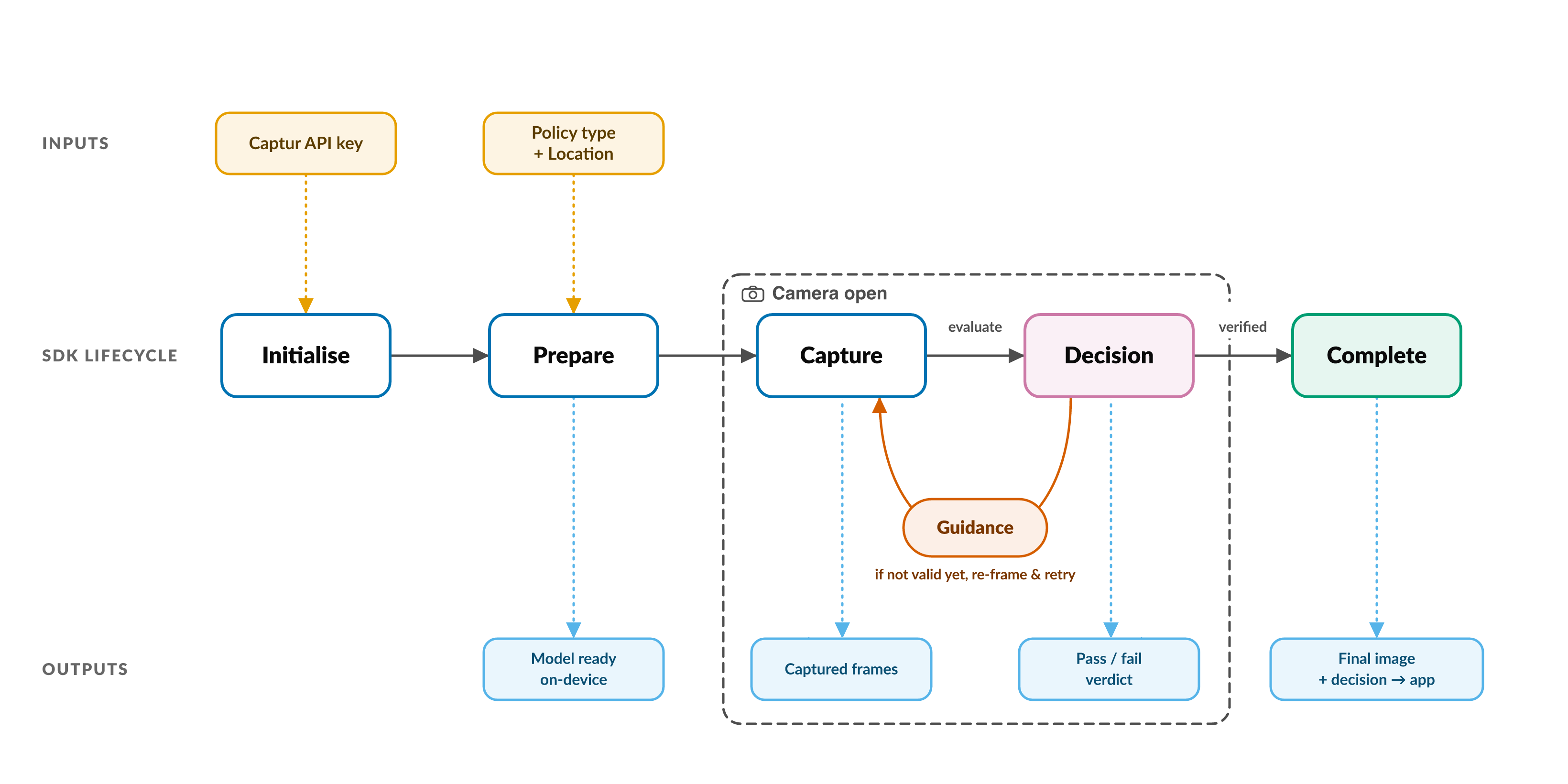
Concepts
- PolicyType: The subject being verified; determines which policy and validation rules apply to the capture.
- Location: A latitude/longitude provided to the SDK, used to determine which model and policy should be applied to the session.
- Model: The on-device machine learning model that analyses the camera input and evaluates it against the active policy.
- Session: A single run of the capture-and-verify flow, from preparation through to the final decision and handoff.
- Attempt: One individual try at capturing a valid image within a session; a session may contain several attempts before a decision is reached.
- Guidance: Real-time feedback shown to the end user to help them frame and capture a valid image (for example, prompts to move closer, steady the camera, or adjust framing).
- Decision: The SDK's final verdict on a capture (whether the image passed verification), returned to the host application along with supporting information.
Lifecycle in detail
A typical use of the SDK moves through three stages: create the SDK once, prepare a session for the capture you're about to take, then start the camera.
1. Captur(apiKey:)
You create a single Captur instance with your API key and keep it for the
lifecycle of the app, preparing sessions as needed. Construction is
synchronous and lightweight. The API key is attached to every backend request
from then on.
Parameters
apiKey: String- your Captur API key, sent with every backend request.
2. prepareSession(...)
Preparing resolves a policy type at a specific location into a ready-to-use
CapturSession. You supply the policy type and the device's latitude and
longitude; the backend resolves the location, and the SDK resolves the matching
policy and readies the model on the device.
Preparation makes a network call to resolve the policy and to ready the right model on the device before the camera is opened. The SDK is resilient to transient connectivity (network requests are retried), but an active connection is needed to prepare a session.
Parameters
policyType: String- the policy type to capture (for example"eBike").CapturLocation- the capture location coordinates (latitude/longitude), used to resolve the policy and model.referenceID: String- the identifier for correlating this session with your own records; used for billing and correlation.
3. prepareCamera(...)
Preparing the camera resolves the policy for the device's current location and returns a camera controller you host in your UI to run the guided capture. It does not start the camera; the live preview and analysis begin only once you display the controller in your UI.
As the location may have changed since the session was prepared, prepareCamera
re-checks the policy against the current location rather than trusting the one
resolved at prepareSession.
The SDK never requests camera permission. Your app must obtain it before displaying the camera.
Parameters
location: CapturLocation- the capture location coordinates (latitude/longitude), re-checked here so the SDK can refresh the policy if the location has changed sinceprepareSession.configuration: CapturCameraConfiguration(optional) - camera configuration such as the initial position and lens.
On-device vs. network
- The model runs on device; image analysis and end-user guidance happen locally.
- Sessions are prepared over the network; the backend resolves the policy and model for the location.
- Once a capture and decision are produced they are sent back to your host application.